> ## Documentation Index
> Fetch the complete documentation index at: https://novu-c5de82d9-nv-8794-quote-reply-docs.mintlify.site/llms.txt
> Use this file to discover all available pages before exploring further.
# Agent Conversations
> View, inspect, and manage agent conversations in the Novu dashboard, including lifecycle state, message history, metadata, and per-channel activity.
Novu provides full observability for agent conversations across both managed agents and custom code agents. You can view and manage conversations in the Novu dashboard. Go to the Activity Feed page and switch to the **Agent Conversations** tab.
## Conversation lifecycle
Every agent conversation follows the same state machine, regardless of agent type:
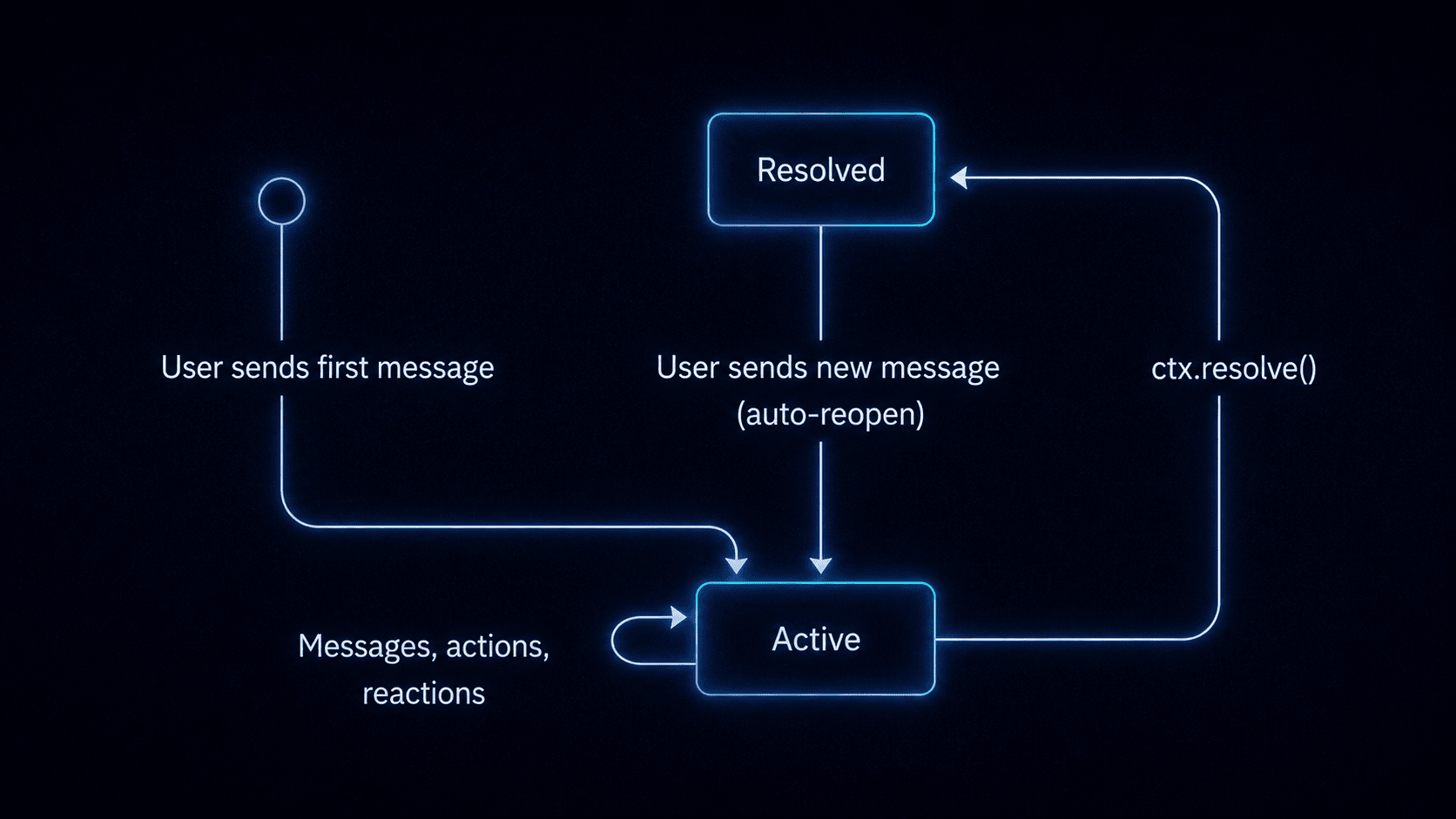 | State | What it means |
| ------------ | --------------------------------------------------------------------------------------------------------------------------------------------------------------------------------------------------------------------------------------------------------------------- |
| **Active** | The conversation is ongoing. Messages increment the count, metadata can be updated, and the last activity timestamp is refreshed. |
| **Resolved** | The conversation has been closed. For custom code agents, this happens when the handler calls `ctx.resolve()` and the `onResolve` handler fires. For managed agents, the platform can resolve the conversation based on its reasoning. An optional summary is stored. |
| **Reopened** | If a user sends a new message after the conversation was resolved, it automatically reopens and becomes active again. |
## What the dashboard shows
Navigate to your agent's detail page to see all conversations, their status, and a complete timeline of activity.
* **Conversation list**: all conversations for the agent, with status (active / resolved), last message preview, message count, and last activity timestamp.
* **Full message history**: every message exchanged between the user and the agent, including rich content (cards, markdown, files).
* **Metadata**: key-value pairs stored on the conversation. In custom code agents, these are set via `ctx.metadata.set()`. In managed agents, the platform may store internal state.
* **Signal activity**: a log of signals fired during the conversation (metadata changes, workflow triggers, resolve events). This applies to custom code agents that use signals.
* **Tool use activity**: for managed agents, the dashboard shows which tools the agent called during each turn, including built-in tools and MCP servers.
* **Participant details**: which subscribers and platform users are part of each conversation, with identity resolution status.
* **Platform context**: which provider and thread the conversation is happening on.
## Inspect conversations from an AI tool
If you have the [Novu MCP server](/platform/build-with-ai/mcp) connected, you can list and debug conversations without opening the dashboard:
1. Call `get_agents` and copy the agent's identifier (slug).
2. Call `get_conversations` with that slug as `agentId`.
3. Call `get_conversation_activities` with a `conv_*` identifier to inspect the timeline (messages, approvals, MCP connection rows).
These MCP tools require the [Novu Cloud account MCP server](/platform/build-with-ai/mcp). Self-hosted Enterprise can still use Conversations in the dashboard and API, but not through `mcp.novu.co`.
## Supported platforms
Both managed agents and custom code agents support the same live channels. Capability details (typing, plan cards, buttons, approvals, edits) live in one place:
* [Channels overview](/agents/channels/overview) (full matrix)
* [Slack](/agents/channels/slack) · [Microsoft Teams](/agents/channels/microsoft-teams) · [WhatsApp](/agents/channels/whatsapp) · [Telegram](/agents/channels/telegram) · [Email](/agents/channels/email) · [Web Chat](/agents/channels/web-chat)
Platform capabilities vary. For example, typing indicators and message edits are unavailable on email, and outbound file attachments are supported on Slack and Microsoft Teams only today.
| State | What it means |
| ------------ | --------------------------------------------------------------------------------------------------------------------------------------------------------------------------------------------------------------------------------------------------------------------- |
| **Active** | The conversation is ongoing. Messages increment the count, metadata can be updated, and the last activity timestamp is refreshed. |
| **Resolved** | The conversation has been closed. For custom code agents, this happens when the handler calls `ctx.resolve()` and the `onResolve` handler fires. For managed agents, the platform can resolve the conversation based on its reasoning. An optional summary is stored. |
| **Reopened** | If a user sends a new message after the conversation was resolved, it automatically reopens and becomes active again. |
## What the dashboard shows
Navigate to your agent's detail page to see all conversations, their status, and a complete timeline of activity.
* **Conversation list**: all conversations for the agent, with status (active / resolved), last message preview, message count, and last activity timestamp.
* **Full message history**: every message exchanged between the user and the agent, including rich content (cards, markdown, files).
* **Metadata**: key-value pairs stored on the conversation. In custom code agents, these are set via `ctx.metadata.set()`. In managed agents, the platform may store internal state.
* **Signal activity**: a log of signals fired during the conversation (metadata changes, workflow triggers, resolve events). This applies to custom code agents that use signals.
* **Tool use activity**: for managed agents, the dashboard shows which tools the agent called during each turn, including built-in tools and MCP servers.
* **Participant details**: which subscribers and platform users are part of each conversation, with identity resolution status.
* **Platform context**: which provider and thread the conversation is happening on.
## Inspect conversations from an AI tool
If you have the [Novu MCP server](/platform/build-with-ai/mcp) connected, you can list and debug conversations without opening the dashboard:
1. Call `get_agents` and copy the agent's identifier (slug).
2. Call `get_conversations` with that slug as `agentId`.
3. Call `get_conversation_activities` with a `conv_*` identifier to inspect the timeline (messages, approvals, MCP connection rows).
These MCP tools require the [Novu Cloud account MCP server](/platform/build-with-ai/mcp). Self-hosted Enterprise can still use Conversations in the dashboard and API, but not through `mcp.novu.co`.
## Supported platforms
Both managed agents and custom code agents support the same live channels. Capability details (typing, plan cards, buttons, approvals, edits) live in one place:
* [Channels overview](/agents/channels/overview) (full matrix)
* [Slack](/agents/channels/slack) · [Microsoft Teams](/agents/channels/microsoft-teams) · [WhatsApp](/agents/channels/whatsapp) · [Telegram](/agents/channels/telegram) · [Email](/agents/channels/email) · [Web Chat](/agents/channels/web-chat)
Platform capabilities vary. For example, typing indicators and message edits are unavailable on email, and outbound file attachments are supported on Slack and Microsoft Teams only today.